 Professional stock photography workflow
Proper keywording is the difference between stock photos that sell and those that get lost in the millions of images uploaded every day. In 2026, with AI-powered search engines and increasingly sophisticated buyer behaviors, understanding how to keyword effectively is more important than ever.
This comprehensive guide covers everything you need to know about stock photo keywording, from fundamental principles to advanced strategies for Shutterstock, Adobe Stock, Getty Images, and other major platforms.
🚀 Skip the manual work? Auto Metadata AI generates accurate keywords, titles, and descriptions for your stock photos in seconds — not hours. Try it free →
Table of Contents
- Why Keywording Matters
- Understanding How Stock Photo Search Works
- The Anatomy of Perfect Keywords
- Platform-Specific Best Practices
- Common Keywording Mistakes to Avoid
- Advanced Keywording Strategies
- Tools & Automation
- Future of Stock Photo Keywording
Why Keywording Matters
In the stock photography industry, keywording is your visibility. No matter how stunning your photos are, if buyers can't find them, they won't sell.
The Numbers Don't Lie

- Over 500 million stock images are available across major platforms
- The average buyer spends less than 10 seconds scanning search results
- 70-80% of downloads happen from the first two pages of search results
- Proper keywording can increase your image visibility by 300-500%
How Search Algorithms Have Evolved in 2026
Modern stock photography platforms use sophisticated AI algorithms that:
- Understand context and semantics, not just exact keyword matches
- Analyze visual content automatically to verify keyword accuracy
- Prioritize relevance over keyword stuffing
- Consider user behavior - click-through rates, downloads, and search refinements
This means that quality beats quantity in 2026. Accurate, relevant keywords will always outperform generic, oversaturated terms.
Understanding How Stock Photo Search Works

Before diving into keywording techniques, it's crucial to understand how buyers search and how platforms rank results.
The Buyer's Journey
- Initial Search: Broad terms like "business meeting" or "sunset landscape"
- Refinement: Adding filters (color, orientation, number of people)
- Specific Search: Narrower terms like "remote team video call" or "golden hour beach sunset"
- Selection: Comparing similar images based on relevance and quality
What Influences Search Rankings
Major platforms like Shutterstock and Adobe Stock rank images based on:
- Keyword Relevance (30-40%) - How well your keywords match the search query
- Visual AI Analysis (25-35%) - What the platform's AI detects in your image
- Performance Metrics (20-30%) - Historical CTR, downloads, and conversion rates
- Recency & Freshness (5-10%) - Newer images often get a temporary boost
- Contributor Quality Score (5-10%) - Your overall portfolio performance
💡 Pro Tip: Focus on keyword accuracy first, then optimize for performance. Misleading keywords will hurt your ranking over time.
The Anatomy of Perfect Keywords

Effective keywords follow a specific structure that balances specificity with searchability.
1. Start with the Main Subject
Your first keyword should always be the primary subject of your image. This is the most critical keyword.
Examples:
- ✅ "businesswoman" (for a portrait of a business professional)
- ✅ "laptop" (for a close-up of a computer)
- ✅ "mountain landscape" (for a scenic mountain view)
2. Describe What's Happening (Actions & Verbs)
Add action-oriented keywords that describe what's taking place in the image.
Examples:
- "typing on keyboard"
- "hiking trail"
- "drinking coffee"
- "video conferencing"
- "cooking dinner"
3. Include Relevant Details
Describe important characteristics:
For People:
- Age range (child, teenager, young adult, middle-aged, senior)
- Gender (when relevant)
- Ethnicity (when it adds search value)
- Emotion (happy, focused, stressed, excited)
- Occupation (doctor, teacher, engineer)
For Objects:
- Color (red car, blue sky, white background)
- Size (large, small, close-up, wide-angle)
- Material (wooden table, metal chair, glass window)
- Condition (new, vintage, modern, rustic)
For Scenes:
- Location type (office, home, outdoor, studio)
- Time of day (morning, sunset, night)
- Season (summer, winter, autumn, spring)
- Weather (sunny, cloudy, rainy, foggy)
4. Add Conceptual Keywords
These are abstract ideas or themes your image represents:
- "success"
- "teamwork"
- "innovation"
- "sustainability"
- "work-life balance"
- "remote work"
- "digital transformation"
5. Include Compositional Terms
Technical and compositional keywords help specific buyers:
- "copy space"
- "isolated on white"
- "overhead view"
- "selective focus"
- "portrait orientation"
- "panorama"
The Optimal Keyword Count
Different platforms have different optimal ranges:
| Platform | Minimum | Maximum | Sweet Spot |
|---|---|---|---|
| Shutterstock | 7 | 50 | 25-35 |
| Adobe Stock | 5 | 50 | 15-25 |
| Getty Images | 5 | 50 | 20-30 |
| iStock | 5 | 50 | 20-30 |
| Pond5 (video) | 5 | 50 | 20-40 |
⚠️ Important: More keywords doesn't mean better visibility. Focus on accuracy and relevance.
Platform-Specific Best Practices

Each major platform has unique algorithms and buyer behaviors. Optimize your keywording strategy accordingly.
Adobe Stock

Algorithm Characteristics:
- Heavily weighs keyword order - first 10 keywords are most important
- Penalizes inaccurate keywords severely
- Prefers 2-word phrases over single words when appropriate
- Strong visual AI verification - misleading keywords hurt rankings
Best Practices:
- Place your most important keywords in positions 1-10
- Avoid compound/long-tail keywords - use individual terms
- Use 15-25 highly relevant keywords
- Include natural language phrases buyers actually search
- Front-load commercial/conceptual terms for business content
Example Keyword Order for "Business Team Meeting":
- teamwork
- business meeting
- corporate
- collaboration
- office
- professionals
- discussion
- strategy
- diverse team
- modern workplace
Shutterstock

Algorithm Characteristics:
- More democratic - all keywords have similar weight
- Allows slightly more keywords (30-40 optimal)
- Strong emphasis on download history
- Uses synonym matching extensively
Best Practices:
- Use 25-35 specific, accurate keywords
- Include both broad and specific terms
- Add relevant synonyms (couch/sofa, automobile/car/vehicle)
- Front-load the main subject but don't over-think order
- Include trending/seasonal terms when applicable
Example Keywords for Same Image:
- business, meeting, teamwork, collaboration, office, corporate, team, discussion, strategy, planning, colleagues, coworkers, diverse, professionals, group, workplace, conference room, brainstorming, business people, working together, communication, corporate culture, leadership, management, startup, tech company, modern office, creative team, project planning
Getty Images & iStock
Algorithm Characteristics:
- Premium platform with editorial focus
- Strong preference for accuracy and authenticity
- Higher editorial standards for keyword approval
- Emphasizes release requirements and legal compliance
Best Practices:
- Use 20-30 highly accurate keywords
- Focus on precise descriptions over conceptual terms
- Include technical details (lens type, lighting style)
- Be specific about locations for editorial content
- Follow strict authenticity guidelines
Pond5 (Video/Footage)
Algorithm Characteristics:
- Specialized for video and motion graphics
- Keywords must describe movement and action
- Technical terms highly valued
- Strong emphasis on usage context
Best Practices:
- Use 25-40 descriptive keywords
- Always include motion descriptors (panning, tracking, aerial, dolly)
- Specify video type (4K, HD, slow-motion, time-lapse)
- Include frame rate when relevant (24fps, 60fps, 120fps)
- Add sound descriptors if audio is included
Common Keywording Mistakes to Avoid

Even experienced contributors make these errors. Avoid them to improve your rankings.
1. Keyword Stuffing
The Mistake: Using all 50 keyword slots with repetitive or barely relevant terms.
Why It's Bad: Modern AI algorithms detect keyword stuffing and penalize your image. It also dilutes the relevance signals.
The Fix: Focus on quality over quantity. 15-25 highly relevant keywords beat 50 marginal ones.
❌ Bad Example: business, business meeting, business people, businessman, businesswoman, business office, business team, business professional, business man, business woman...
✅ Good Example: business meeting, teamwork, corporate, office, professionals, collaboration, discussion, diverse team, strategy session, conference room
2. Irrelevant Keywords
The Mistake: Adding popular search terms that don't accurately describe your image.
Why It's Bad:
- Buyers won't download mismatched images (hurts your CTR)
- Platform AI detects mismatches and lowers your ranking
- Your contributor quality score drops
- You may face account penalties
The Fix: Only use keywords you can honestly defend if questioned.
❌ Bad: Tagging a city office photo with "beach, vacation, tropical, sunset" to catch popular searches
✅ Good: Only use keywords that accurately describe what's visibly in the photo
3. Ignoring Keyword Order (on Order-Sensitive Platforms)
The Mistake: Random keyword order without strategic planning.
Why It's Bad: On platforms like Adobe Stock, the first 10-15 keywords carry significantly more weight.
The Fix: Structure keywords by importance:
- Main subject (1-2 keywords)
- Secondary subjects (3-5 keywords)
- Actions and concepts (6-10 keywords)
- Descriptive details (11-20 keywords)
- Compositional terms (21-25 keywords)
4. Being Too Generic
The Mistake: Using only broad, oversaturated keywords.
Why It's Bad: You're competing with millions of images. Generic keywords = lower visibility.
The Fix: Balance generic terms with specific, niche keywords.
❌ Too Generic: woman, computer, work, office, business
✅ Balanced: remote worker, home office, video call, laptop, working from home, female professional, digital nomad, telecommuting, zoom meeting, flexible workplace
5. Neglecting Long-Tail Opportunities
The Mistake: Only using 1-2 word keywords.
Why It's Bad: Long-tail keywords have less competition and higher conversion rates.
The Fix: Include specific multi-word phrases buyers actually search.
Examples:
- "woman working from home with dog"
- "diverse team celebrating project success"
- "sustainable business practices concept"
- "artificial intelligence technology abstract"
6. Forgetting Conceptual Keywords
The Mistake: Only describing what's literally visible.
Why It's Bad: Buyers often search for concepts and ideas, not just objects.
The Fix: Think about what your image represents beyond what's visible.
Example - Photo of Person Climbing Mountain:
- ✅ Literal: hiker, mountain, backpack, trail, outdoor, climbing
- ✅ Conceptual: challenge, achievement, perseverance, goal, success, overcoming obstacles, personal growth, ambition
7. Ignoring Trends and Seasonality
The Mistake: Using the same keywords year-round without considering trends.
Why It's Bad: Missed opportunities for seasonal and trending searches.
The Fix: Update keywords quarterly to include:
- Seasonal terms (holiday, summer vacation, back to school)
- Current trends (AI technology, sustainable living, remote work)
- Cultural moments (social movements, global events)
Advanced Keywording Strategies

Take your keywording to the next level with these professional techniques.
Strategy 1: Competitor Analysis
How It Works: Research top-performing images similar to yours and analyze their keywords.
Steps:
- Search for your image type on target platforms
- Click on top-ranked images (first 2 pages)
- View their keywords (when visible)
- Note patterns, frequently used terms, and unique phrases
- Adapt (don't copy) successful strategies to your images
Tools:
- Shutterstock Keyword Suggestion Tool
- Adobe Stock Search Trends
- Google Trends for general interest
- Microstockgroup forums for insights
Strategy 2: Search Query Research
How It Works: Understand what buyers actually type into search boxes.
Steps:
- Use platform search bars and note autocomplete suggestions
- Analyze "related searches" at bottom of results pages
- Check Google Search Console if you have a portfolio site
- Join stock photographer communities to learn buyer language
Example: If you search "business meeting" on Shutterstock, autocomplete might show:
- "business meeting video call"
- "business meeting diverse team"
- "business meeting outdoor"
- "business meeting creative office"
These are real search queries - use them as keywords!
Strategy 3: Semantic Clustering

How It Works: Group related keywords to create thematic relevance.
Example - Portrait of Young Female Entrepreneur:
Cluster 1 - Subject:
- woman, female, businesswoman, entrepreneur, professional
Cluster 2 - Demographics:
- young adult, millennial, 30s, confident, successful
Cluster 3 - Context:
- startup, small business, business owner, CEO, founder, leadership
Cluster 4 - Concept:
- empowerment, success, innovation, determination, ambition
Cluster 5 - Setting:
- modern office, coworking space, creative workspace, tech startup
This approach creates semantic relationships that AI algorithms recognize as highly relevant.
Strategy 4: Geographic Targeting

How It Works: Add location-specific keywords when applicable.
When to Use:
- Identifiable landmarks or cities
- Cultural or regional content
- Travel and tourism images
- Editorial photos
Examples:
- "New York City skyline"
- "Tokyo street scene"
- "Paris Eiffel Tower"
- "California coastline"
Pro Tip: Be honest - don't tag a generic beach as "Maldives" if it's not.
Strategy 5: Technical Specification Keywords
How It Works: Add technical terms that professional buyers search for.
Examples:
- "copy space" - image has room for text
- "isolated on white" - clean background for compositing
- "shallow depth of field" - bokeh/blurred background
- "overhead view" / "flat lay" - top-down composition
- "negative space" - minimalist composition with empty space
- "rule of thirds" - compositionally balanced
Strategy 6: Niche Specialization
How It Works: Become the go-to contributor for specific niches with specialized keywords.
Examples of Profitable Niches:
- Healthcare: medical procedure, telehealth, patient care
- Technology: AI, machine learning, cybersecurity, cloud computing
- Sustainability: renewable energy, zero waste, circular economy
- Finance: cryptocurrency, fintech, investment, stock market
- Education: e-learning, online education, homeschool, STEM
Benefits:
- Less competition
- Higher prices
- Loyal buyer base
- Expertise reputation
Tools & Automation

Modern tools can dramatically speed up your keywording workflow while maintaining quality.
AI-Powered Metadata Generators
The biggest workflow improvement for stock photographers in 2026 is AI-powered keywording automation.
How It Works
AI tools analyze your images using computer vision and generate:
- Accurate, relevant keywords
- SEO-optimized titles
- Compelling descriptions
- Platform-specific CSV exports
Benefits
- Save 80-90% of keywording time
- Process hundreds of images in minutes
- Consistent keyword quality
- Discover keywords you might miss
- Reduce repetitive strain injury from typing
Auto Metadata AI (Recommended)
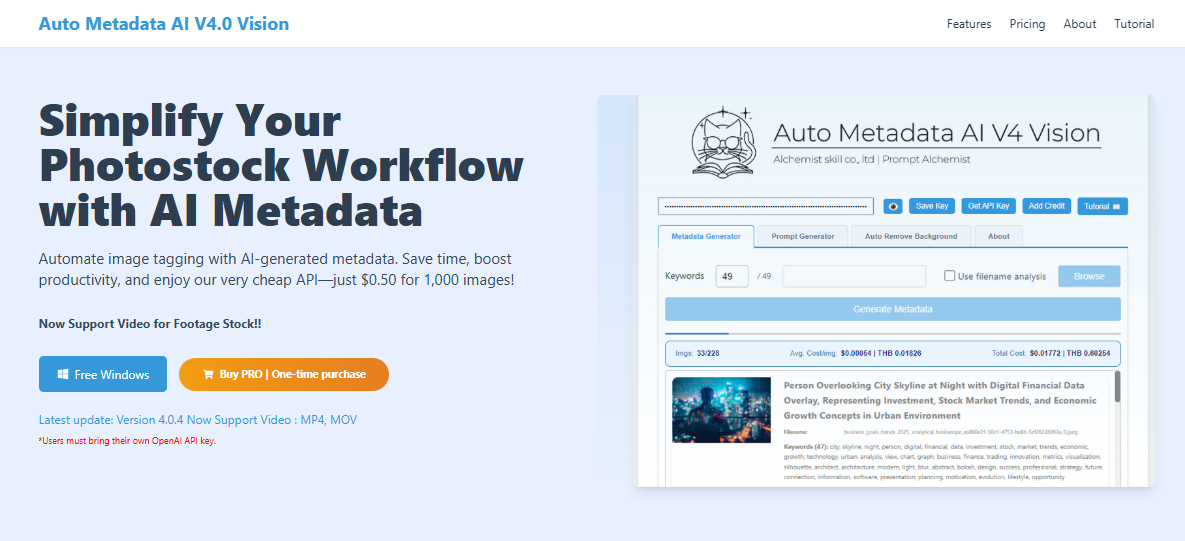
Our tool is specifically designed for stock photographers:
Features:
- Generates 10-49 keywords per image
- Supports JPG, PNG, MP4, MOV formats
- CSV export for Shutterstock, Adobe Stock, Getty, Pond5
- BYO OpenAI key - just $0.50 per 1,000 images
- Batch processing unlimited images (Pro version)
- Background removal and prompt generation included
Cost Comparison:
- Manual keywording: 5-10 minutes per image
- Auto Metadata AI: 5-10 seconds per image
- ROI: 60-120x time savings
Free Version Available: Download Auto Metadata AI Free
Traditional Keywording Tools
If you prefer manual keywording, these tools help:
1. Xpiks (Desktop - Free/Paid)
- Batch metadata editing
- FTP upload to multiple platforms
- Keyword suggestions
- Spell checking
2. Adobe Lightroom (Paid)
- Keyword management and hierarchies
- Batch processing
- IPTC metadata embedding
- Note: Alphabetizes keywords (not ideal for Adobe Stock)
3. Stock Submitter (Paid)
- Multi-platform CSV generation
- Automated uploading
- Portfolio management
4. Shutterstock Keyword Tool (Free)
- Platform-specific suggestions
- Search volume data
- Related terms
Browser Extensions
Easy Keywords for Adobe Stock (Chrome)
- Adds keywords directly in Adobe Stock Contributor portal
- Saves time on manual entry
- Free
Future of Stock Photo Keywording

Understanding upcoming trends helps you stay ahead of the curve.
Trend 1: Visual Search Dominance
By 2027-2028, expect "search by image" to become the primary discovery method.
What This Means:
- Visual similarity matters more than keywords
- Focus on unique compositions and concepts
- Keywording won't disappear but will become supplementary
- AI-generated images will flood the market, making authentic photos more valuable
Action Steps:
- Continue keywording accurately (AI uses it for training)
- Focus on unique, hard-to-replicate photos
- Build strong conceptual storytelling
Trend 2: Semantic Search Evolution
Search engines understand intent and context, not just literal keywords.
Example: A search for "work stress" might return images of:
- Tired person at desk
- Clock showing late hours
- Messy desk with coffee cups
- Person with frustrated expression
Even if the keyword "stress" isn't explicitly in the metadata, the AI understands the concept.
Action Steps:
- Focus on concepts and storytelling
- Use natural language in titles/descriptions
- Don't over-optimize for exact matches
Trend 3: Ethical & Inclusive Representation

Buyers increasingly demand authentic, diverse, inclusive content.
Trending Keywords in 2026:
- "authentic diversity"
- "inclusive workplace"
- "body positive"
- "gender non-binary"
- "accessibility"
- "neurodiversity"
- "cultural authenticity"
Action Steps:
- Photograph real people in real situations
- Avoid stereotypes and tokenism
- Use inclusive language in keywords
- Show diverse age, body type, ability, ethnicity, gender
Trend 4: Sustainability & Climate Focus
Environmental themes dominate buyer searches.
Trending Keywords:
- "renewable energy"
- "circular economy"
- "zero waste lifestyle"
- "sustainable business"
- "climate action"
- "green technology"
- "eco-friendly"
Trend 5: AI-Generated Content Labeling
Platforms will require disclosure of AI-generated or AI-enhanced images.
Action Steps:
- Keep clear records of your shooting and editing process
- Embrace "authentic photography" as a differentiator
- Use keywords like "genuine," "authentic," "real," "unposed"
Conclusion: Master Keywording to Maximize Sales
Effective stock photo keywording is both an art and a science. By following the strategies in this guide, you'll:
- ✅ Increase your image visibility by 300-500%
- ✅ Rank higher in search results
- ✅ Reach the right buyers at the right time
- ✅ Build a sustainable, profitable stock photography business
Quick Recap: The 5 Keywording Commandments

- Accuracy First - Only use truthful, relevant keywords
- Structure Matters - Order keywords strategically (platform-dependent)
- Quality Over Quantity - 15-25 great keywords beat 50 mediocre ones
- Think Like a Buyer - Use terms people actually search
- Automate When Possible - Save time with AI tools for consistency
Your Next Steps
- Audit Your Current Keywords - Review your top 20 images and optimize based on this guide
- Test and Measure - Track which keyword strategies improve your rankings
- Automate Your Workflow - Consider AI tools to scale your productivity
- Stay Updated - Follow platform blogs and contributor forums for algorithm changes
Save Hours with Automated Keywording
Ready to speed up your workflow? Auto Metadata AI generates accurate keywords, titles, and descriptions in seconds - not hours.
Try it free: Download Auto Metadata AI