Keyword 1,000 stock photosin minutes, not a week.
Auto Metadata AI writes titles, descriptions and 49 keywords for your photo and video files, embeds them straight into the metadata, and exports CSVs for Shutterstock, Adobe Stock, Getty Images and Pond5.
Bring your own OpenAI key · No subscription · Lifetime updates for Pro
- $0.0002
- Per image · nano
- Up to 49
- Keywords / image
- ~10 / 3s
- Throughput
- 4+
- Stock platforms
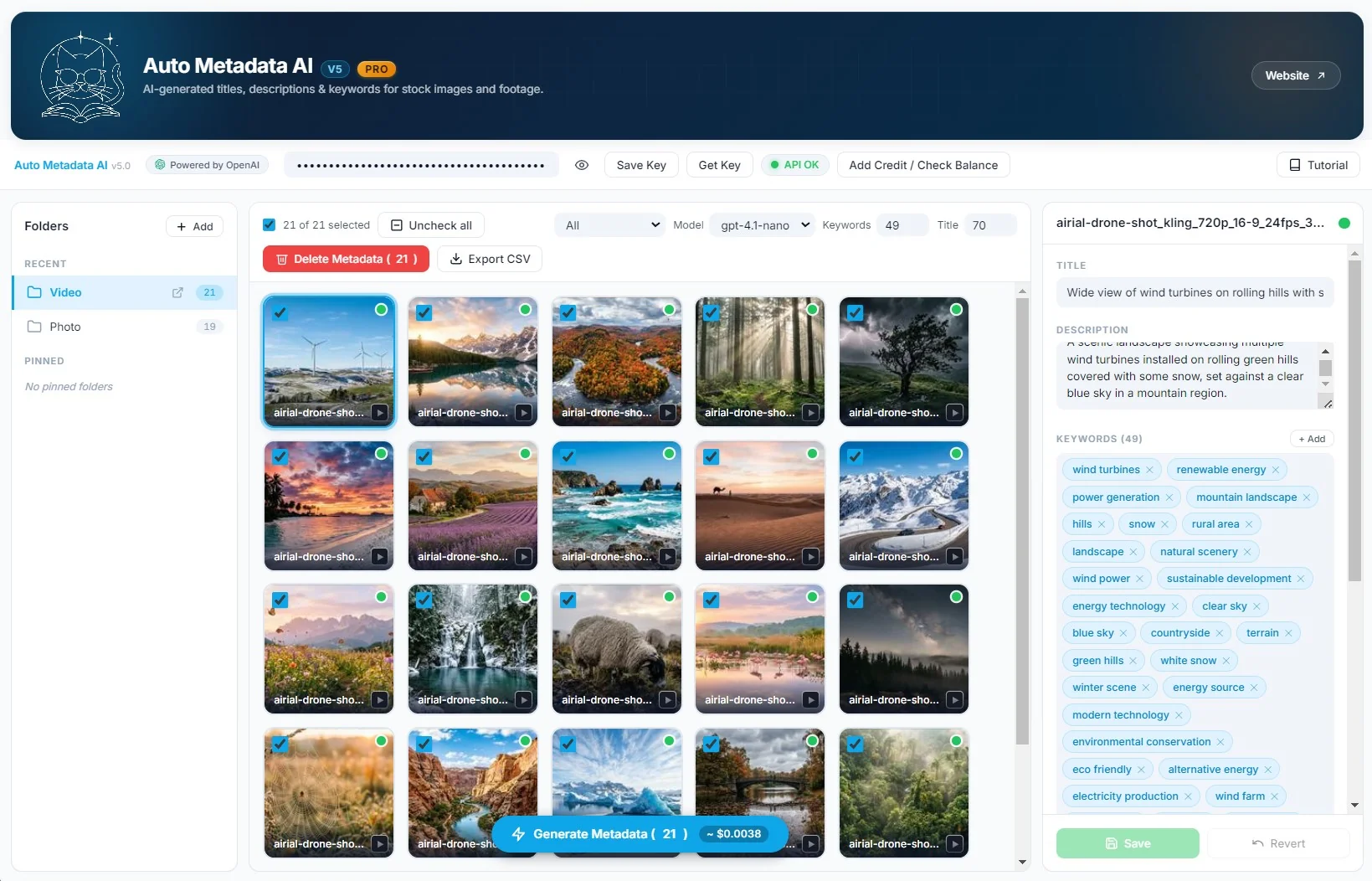
Drop in. Generate. Embed. Upload.
The whole loop runs on your machine. No upload to a service, no waiting in queue — your OpenAI key, your files, your CSV.
- 01
Drop in a folder of assets
Photos and footage, mixed. JPG, JPEG, PNG, MP4, MOV — up to thousands at a time. No file-size limit.
- 02
AI writes title, description and 49 keywords
Pick gpt-4.1-nano for the cheapest run or gpt-4.1-mini for richer descriptions. Roughly 10 assets every 3–4 seconds.
- 03
Edit anything inline
Fix a title, rewrite a description, add or remove a keyword. Save and Revert per asset — never lose the AI baseline.
- 04
Embed into the file & export CSV
Metadata is written into the image itself (XMP/IPTC) so platforms read it on upload. Plus a pre-formatted CSV per platform.
Title, description, 49 keywords — every file, in one batch.
Select a hundred photos or a thousand. Hit Generate. The AI reads every image and writes stock-ready metadata in parallel — no manual tagging, no per-file babysitting.
- Up to 49 SEO-optimized keywords per asset
- Multi-select across the grid for batch generate / delete
- Title and keyword counters built into the toolbar
One workflow. Stills and footage, side by side.
Don't juggle two tools for two formats. JPG, JPEG, PNG and MP4, MOV all run through the same toolbar, the same models, the same export.
- Same AI model handles photos and stock footage
- No file-size limit — drop in 4K MOVs without splitting
- CSV exports recognise asset type per platform
Metadata is written into the image itself.
Auto Metadata AI writes title, description and keywords into the file's XMP and IPTC fields. Upload to Shutterstock or Adobe Stock and the platform reads them on the way in. No copy-paste, no re-tagging.
- Standards-compliant XMP / IPTC writes
- Per-platform CSV exports as a fallback
- Originals preserved — non-destructive
One click. Four platforms. No reformatting.
Pre-formatted CSV exports for Shutterstock, Adobe Stock, Getty Images and Pond5 — column order, field names and keyword separators all match each platform's spec.
- Shutterstock export
- Adobe Stock export
- Getty Images export
- Pond5 export
What's newin version 5.
A workflow rebuild — organize libraries, edit metadata in place, switch between two new vision models, and pay 60% less per image.
Free for every existing Pro customer.
Workspace & folders
Pin Video, Photo or any custom folder. Switch context in one click.
Inline metadata editor
Edit title, description and keywords without leaving the asset.
GPT-4.1 mini & nano
Two new vision models. Pick nano for cheapest, mini for richer descriptions.
60% cheaper API
Down to ~$0.0002 per image with nano — about $0.20 per 1,000.
One purchase. Free forever for the basics.
Pro is a single $75 payment. No subscription, no per-image fees, no markup on the API — you bring your OpenAI key and pay them direct.
Try the workflow
- 50 assets per day
- 10 keywords per image
- Photo + video (JPG, PNG, MP4, MOV)
- CSV export to all 4 platforms
- Embedded XMP / IPTC metadata
- Workspace & inline editor (v5)
Unlock everything
Lifetime updates · v5 included
- Unlimited images & videos
- 45–49 keywords per asset
- gpt-4.1-mini & nano models
- Embedded XMP / IPTC + CSV exports
- Workspace, folders & pin
- Inline metadata editor
- Priority email support
Drop in a folder of any size. The app processes assets in parallel — roughly 10 every 3–4 seconds with the nano model — and writes metadata directly into each file. There's no file-size limit and no per-day cap on Pro.
Yes. Title, description and keywords are written into the file's XMP/IPTC fields. When you upload to Shutterstock, Adobe Stock or Getty, the platform reads them automatically — no copy-paste, no re-tagging. CSV export is also generated as a fallback / for Pond5.
Full support for MP4 and MOV stock footage in the same workflow as photos. Same toolbar, same models, same batch.
v5 adds a Workspace with folder organization, an inline metadata editor (edit titles/descriptions/keywords without leaving the app), two new vision models (gpt-4.1-mini and gpt-4.1-nano), and 60% cheaper API — about $0.0002 per image with nano.
With gpt-4.1-nano it's about $0.0002 per image — roughly $0.20 for 1,000 images. We never mark up API costs: you bring your own OpenAI key and pay OpenAI directly.
Free: 50 assets per day, 10 keywords per image. Pro ($75 one-time, no subscription): unlimited assets, 45–49 keywords per image, priority support, lifetime updates including v5 and beyond.
Yes. Every Pro license holder gets v5.0.0 and every future release at no extra cost. We email the new download link on each release.
Shutterstock, Adobe Stock, Getty Images and Pond5 — pre-formatted CSV per platform, plus embedded metadata that any of them can read directly.
Stop hand-keywording. Ship more stock.
Auto Metadata AI v5 — Windows desktop. Free version is fully functional, Pro removes the daily cap.